> For the complete documentation index, see [llms.txt](https://deployment.gitbook.io/love/llms.txt). Markdown versions of documentation pages are available by appending `.md` to page URLs; this page is available as [Markdown](https://deployment.gitbook.io/love/whitepaper/cpp/pimpl.md).
# Pimpl设计模式|编译防火墙
### PIMPL模式引入
PIMPL模式引入 Pimpl(pointer to implementation,指向实现的指针)是一种常用的,用来对“类的接口与实现”进行解耦的方法。这个技巧可以避免在头文件中暴露私有细节,因此是促进API接口与实现保持完全分离的重要机制。但是Pimpl并不是严格意义上的设计模式(它是受制于C++特定限制的变通方案),这种惯用法可以看作桥接设计模式的一种特例。
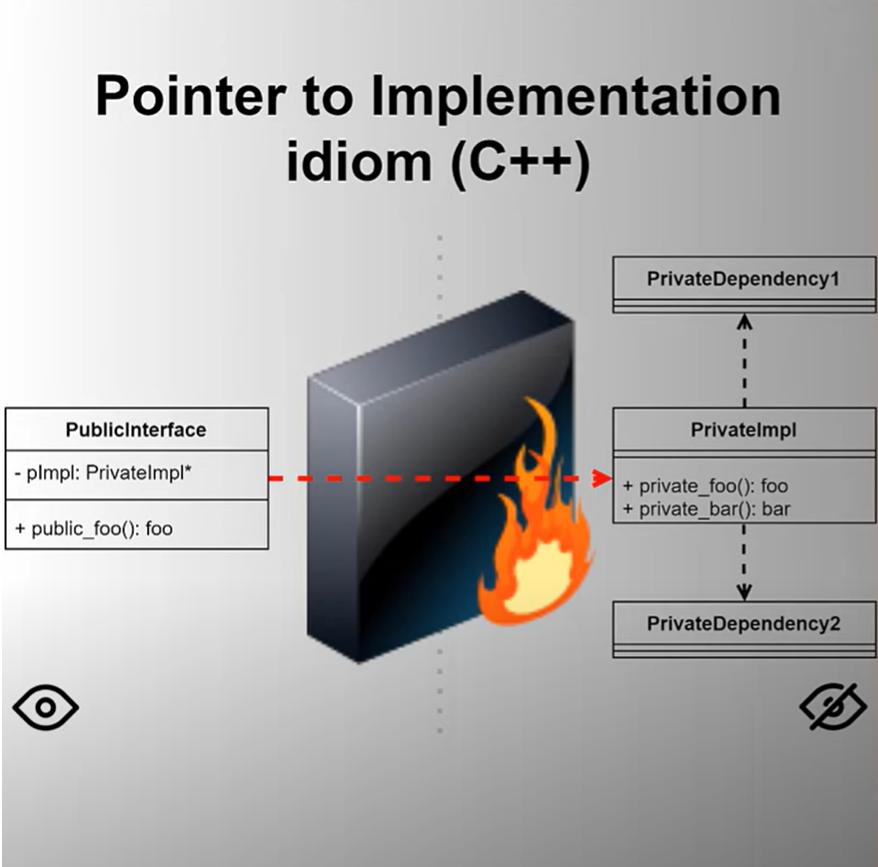 ### Pimpl模式的好处
1. **信息隐藏**:通过将实现细节移到`Impl`类中,接口类的头文件不再暴露任何实现细节,从而实现了信息隐藏。
2. **减少编译依赖**:因为实现细节完全隐藏在实现文件中,接口头文件的更改不会导致依赖它的代码重新编译,从而减少了编译时间。
3. **二进制兼容性**:由于接口类的大小和布局保持不变,改动实现类的细节不会影响使用接口类的二进制文件,这有利于库的升级和维护。
4. **更好的模块化**:将实现细节与接口分离,可以更好地模块化代码,增强代码的可维护性和可读性。
### Pimpl模式的实现
**示例代码:未使用Pimpl模式**
假设我们有一个`Widget`类,其实现如下:
```cpp
// Widget.h
#ifndef WIDGET_H
#define WIDGET_H
#include
#include
class Widget {
public:
Widget();
~Widget();
void doSomething();
void addValue(int value);
private:
std::string name;
std::vector values;
};
#endif // WIDGET_H
// Widget.cpp
#include "Widget.h"
#include
Widget::Widget() : name("default") {}
Widget::~Widget() {}
void Widget::doSomething() {
std::cout << "Widget name: " << name << std::endl;
for (int value : values) {
std::cout << "Value: " << value << std::endl;
}
}
void Widget::addValue(int value) {
values.push_back(value);
}
```
在这个实现中,`Widget`类的实现细节(`name`和`values`成员)暴露在头文件中,导致头文件的更改会影响所有包含它的文件。
* 头文件(`.h`或`.hpp`文件)通常包含类的声明、函数原型、宏定义等。头文件的变化会影响所有包含它的源文件,主要原因是:当一个源文件包含一个头文件时,编译器会将头文件的内容插入到源文件中。如果头文件中的内容发生变化,所有包含该头文件的源文件都需要重新编译,以确保生成的目标文件与新的头文件内容一致。
* 源文件(`.cpp`或`.cc`文件)包含类或函数的具体实现。源文件的变化通常只需要重新编译自身,而不会影响其他源文件的编译,除非其他源文件依赖于修改后的源文件的编译结果。
**示例代码:使用Pimpl模式**
我们将改造`Widget`类,使其采用Pimpl模式:
```cpp
// Widget.h
#ifndef WIDGET_H
#define WIDGET_H
#include
class Widget {
public:
Widget();
~Widget();
void doSomething();
void addValue(int value);
private:
class Impl; // 前向声明实现类
std::unique_ptr pImpl; // 使用unique_ptr管理实现类
};
#endif // WIDGET_H
// Widget.cpp
#include "Widget.h"
#include
#include
#include
// 实现类的定义
class Widget::Impl {
public:
Impl() : name("default") {}
~Impl() {}
void doSomething() {
std::cout << "Widget name: " << name << std::endl;
for (int value : values) {
std::cout << "Value: " << value << std::endl;
}
}
void addValue(int value) {
values.push_back(value);
}
private:
std::string name;
std::vector values;
};
// Widget成员函数的定义
Widget::Widget() : pImpl(std::make_unique()) {}
Widget::~Widget() = default;
void Widget::doSomething() {
pImpl->doSomething();
}
void Widget::addValue(int value) {
pImpl->addValue(value);
}
```
在这个改造后的版本中,我们将实现细节移到了`Impl`类中,接口类`Widget`仅持有一个指向实现类的指针。
### Pimpl模式的详细解释
* 在`Widget`的构造函数中,初始化`pImpl`,使用`std::make_unique()`来创建实现类的实例。在析构函数中,使用`default`关键字,让编译器自动生成析构函数,以确保`std::unique_ptr`能够正确地销毁实现类的实例。
* 在`Widget`的成员函数中,将所有操作委托给`pImpl`。例如,`doSomething`函数调用了`pImpl->doSomething()`,`addValue`函数调用了`pImpl->addValue(value)`。
### reference
*
*
*
### Pimpl模式的好处
1. **信息隐藏**:通过将实现细节移到`Impl`类中,接口类的头文件不再暴露任何实现细节,从而实现了信息隐藏。
2. **减少编译依赖**:因为实现细节完全隐藏在实现文件中,接口头文件的更改不会导致依赖它的代码重新编译,从而减少了编译时间。
3. **二进制兼容性**:由于接口类的大小和布局保持不变,改动实现类的细节不会影响使用接口类的二进制文件,这有利于库的升级和维护。
4. **更好的模块化**:将实现细节与接口分离,可以更好地模块化代码,增强代码的可维护性和可读性。
### Pimpl模式的实现
**示例代码:未使用Pimpl模式**
假设我们有一个`Widget`类,其实现如下:
```cpp
// Widget.h
#ifndef WIDGET_H
#define WIDGET_H
#include
#include
class Widget {
public:
Widget();
~Widget();
void doSomething();
void addValue(int value);
private:
std::string name;
std::vector values;
};
#endif // WIDGET_H
// Widget.cpp
#include "Widget.h"
#include
Widget::Widget() : name("default") {}
Widget::~Widget() {}
void Widget::doSomething() {
std::cout << "Widget name: " << name << std::endl;
for (int value : values) {
std::cout << "Value: " << value << std::endl;
}
}
void Widget::addValue(int value) {
values.push_back(value);
}
```
在这个实现中,`Widget`类的实现细节(`name`和`values`成员)暴露在头文件中,导致头文件的更改会影响所有包含它的文件。
* 头文件(`.h`或`.hpp`文件)通常包含类的声明、函数原型、宏定义等。头文件的变化会影响所有包含它的源文件,主要原因是:当一个源文件包含一个头文件时,编译器会将头文件的内容插入到源文件中。如果头文件中的内容发生变化,所有包含该头文件的源文件都需要重新编译,以确保生成的目标文件与新的头文件内容一致。
* 源文件(`.cpp`或`.cc`文件)包含类或函数的具体实现。源文件的变化通常只需要重新编译自身,而不会影响其他源文件的编译,除非其他源文件依赖于修改后的源文件的编译结果。
**示例代码:使用Pimpl模式**
我们将改造`Widget`类,使其采用Pimpl模式:
```cpp
// Widget.h
#ifndef WIDGET_H
#define WIDGET_H
#include
class Widget {
public:
Widget();
~Widget();
void doSomething();
void addValue(int value);
private:
class Impl; // 前向声明实现类
std::unique_ptr pImpl; // 使用unique_ptr管理实现类
};
#endif // WIDGET_H
// Widget.cpp
#include "Widget.h"
#include
#include
#include
// 实现类的定义
class Widget::Impl {
public:
Impl() : name("default") {}
~Impl() {}
void doSomething() {
std::cout << "Widget name: " << name << std::endl;
for (int value : values) {
std::cout << "Value: " << value << std::endl;
}
}
void addValue(int value) {
values.push_back(value);
}
private:
std::string name;
std::vector values;
};
// Widget成员函数的定义
Widget::Widget() : pImpl(std::make_unique()) {}
Widget::~Widget() = default;
void Widget::doSomething() {
pImpl->doSomething();
}
void Widget::addValue(int value) {
pImpl->addValue(value);
}
```
在这个改造后的版本中,我们将实现细节移到了`Impl`类中,接口类`Widget`仅持有一个指向实现类的指针。
### Pimpl模式的详细解释
* 在`Widget`的构造函数中,初始化`pImpl`,使用`std::make_unique()`来创建实现类的实例。在析构函数中,使用`default`关键字,让编译器自动生成析构函数,以确保`std::unique_ptr`能够正确地销毁实现类的实例。
* 在`Widget`的成员函数中,将所有操作委托给`pImpl`。例如,`doSomething`函数调用了`pImpl->doSomething()`,`addValue`函数调用了`pImpl->addValue(value)`。
### reference
*
*
*